 Memberium
- Install the wordpress plug in called ‘Widget Logic’ By Mark Maunder, or install a similar plugin that allows you to conditionally control the appearance of widgets.
- At bottom of widget under widget logic paste
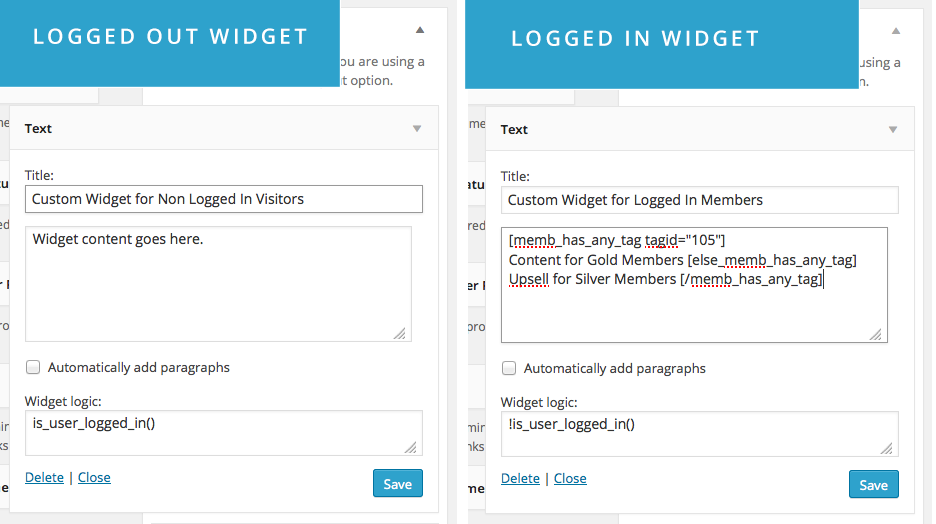
is_user_logged_in()= this widget will only be shown to logged in members (see example screenshot below)
!is_user_logged_in()= this widget will only be shown to non logged in members (see example screenshot below)
Also available forActiveCampaign
How do I show different widgets to logged in or logged out members?
Summary
is_user_logged_in() = this widget will only be shown to logged in members (see example screenshot below)
Need more help?
We're here to help.
Can't find what you need in the Keap docs? Three ways to get unblocked.
Submit a ticket
Get a written answer from our support team — most tickets get a first response within one business day.
Open a ticket →Book a call
Talk one-on-one with a Memberium specialist about your setup, automations, or a tricky integration.
Schedule a call →Office hours
Drop into a live group session, get your questions answered in real time, and learn from other members' setups.
Join office hours →