 Memberium
Description
Allows you to insert content or metadata from a post, page, or partial into the current position of the shortcode. The shortcodes [memb_include_post], [memb_include_page], and [memb_include_partial] are synonymous and have no real difference. You can identify the content by post ID or by title.
Shortcode Examples
Basic usage:
[memb_include_partial id=48][memb_include_post id=246][memb_include_page id=49]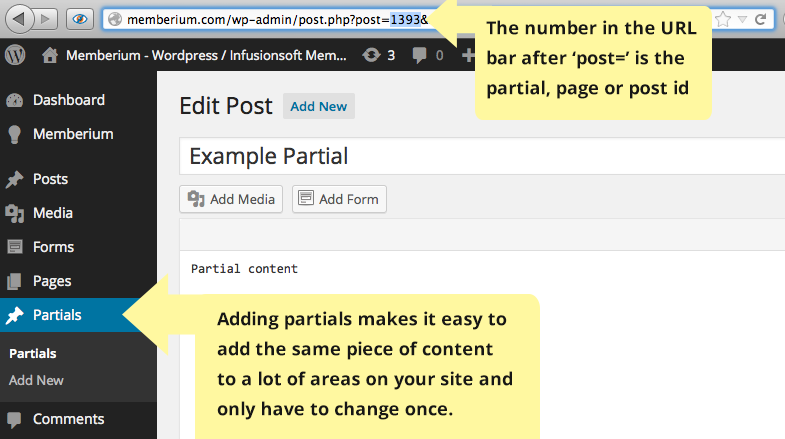
Retrieving a specific field:
[memb_include_post id=46 field=post_date_gmt]Applying text formatting:
[memb_include_post id=46 txtfmt=strtoupper]Shortcode Parameters
id | The post ID (numeric), slug, or title of the content to include. (Required) |
|---|---|
field | The post field to retrieve. Restricted to post_content, post_title, and post_excerpt. Default: post_content. |
type | Post type to include. Auto-detected from the shortcode tag: [memb_include_partial] uses 'partials', [memb_include_page] uses 'page', all others use 'post'. |
length | Maximum character length of the output. Uses balanced tag truncation. Set to 0 for no limit. Default: 0. |
tagid | Comma-separated tag IDs. The contact must have at least one of the specified tags for the shortcode to display content. |
bypass_permissions | Set to 1 to bypass access and publish checks. Default: 0. |
txtfmt | A comma-separated list of text processing functions to apply to the output. |
capture | Captures the shortcode output and routes it to a variable for later use. |
Additional Information
Take care not to recursively include pages. The default field to return is post_content. For security, only the following fields may be retrieved:
post_contentpost_titlepost_excerpt
Additional fields can be enabled via the memberium/shortcodes/include_post/allowed_fields filter.
Shortcode Attributes
| Conditional | No |
|---|---|
| Nestable | No |
| Accepts formatting | Yes |
| Capturable | No |