 Memberium
With Memberium, you can easily sync users that are created through WooCommerce to Infusionsoft. Here’s a detailed tutorial on how you can do this.

What You’ll Need:
- Latest version of Memberium and i2SDK
- WooCommerce
Enabling Sync new Registration option in Memberium
The first thing that you’ll need to do is to enable this option from Memberium’s setting.
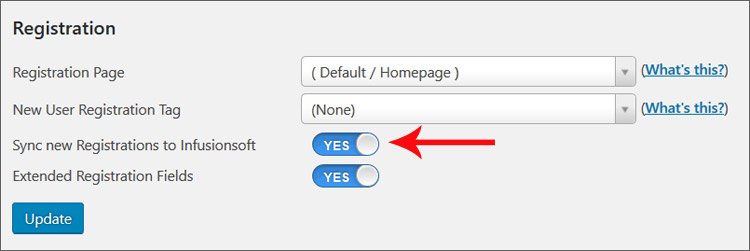
Go to Memberium > Settings > Site Security and enable “Sync new Registration to Infusionsoft”.
Basically this option will sync new registrations from your site to Infusionsoft once its enabled.
WooCommerce Settings
Now let’s take a look at WooCommerce settings.
Go to WooCommerce > Settings and click on “Accounts & Privacy” tab from the top which will open the Accounts page.
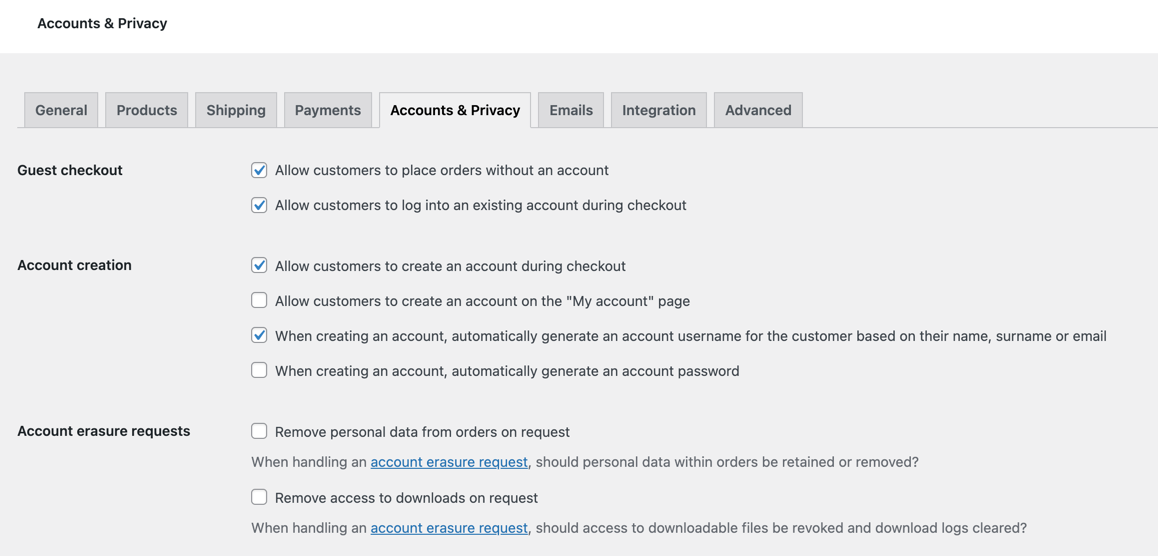
You will need to set these to your specific needs. The settings are pretty self-explanatory.
If you’d like WooCommerce to automatically generate passwords for your users, enable ‘When creating an account, automatically generate an account password’.
If this option is not enabled, then WooCommerce will not auto-generate a password but your users/customers can type a password during the checkout process. Memberium will sync this password to Keap/Infusionsoft either way.