 Memberium
If you’re using Keap alongside Memberium’s Umbrella Accounts feature, you may have run into a slight issue where you don’t have access to actionsets which are necessary in order to trigger password generation and a welcome email for the newly added child account.
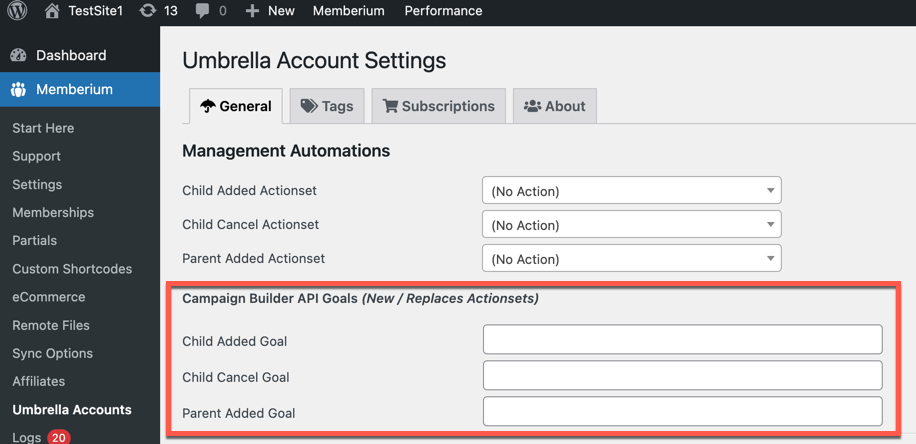
In the latest version of Memberium for Keap, you now have the option to trigger an API goal instead of just an actionset.
What are API Goals?
API Goals are a way to trigger a Keap campaign (now called Advanced Automations) using a third-party tool like Memberium.
Here is a video which explains how to use Keap API Goals with Memberium.
Umbrella Account API Goal Options Explained
Here is an overview of each option and what it triggers:
Child Added Goal
This goal will be triggered when a child account is added. Child accounts are added by the parent account filling out the [umbrella_enroll_child] form.
You will want to configure a password to be generated for the child account and you’ll likely want to fire off an email containing the password so the new child member can log into the site.
Actions on this goal will be applied to the associated child contact that was added.
Child Cancel Goal
The Child Cancel Goal will be triggered when a parent account removes a child account. This is done using the cancel button generated by the [umbrella_list_children] shortcode.
Actions on this goal will be applied to the associated child contact that was cancelled.
Parent Added Goal
The Parent Added Goal will be triggered when a parent adds a new child account.
This could be used to trigger automation or apply a tag to the parent. Useful if you want to make sure parent members add a child account by sending reminder emails to “Add Your Team” and then stopping those reminders when they add someone. That is just one simple example of how that could be used.
Actions on this goal will be applied to the parent account contact record.