 Memberium
Description
The change password form will ONLY display to logged users that are mapped to ActiveCampaign contacts. It will not display for admins, or for local users. Please note that the password won’t be updated in selected ActiveCampaign password field due to security reasons, instead it’s saved in WordPress only.
Shortcode Examples
Unstyled Form:
[memb_change_password]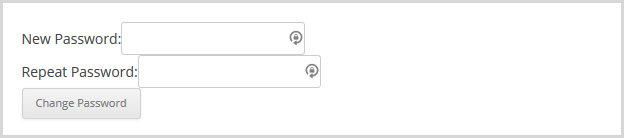
Custom button text example:
[memb_change_password buttontext="Change My Password"]
The below shortcode will display a custom label rather than the default “New Password” and “Repeat Password.”
[memb_change_password password1label= "Enter a New Password:" password2label="Confirm the New Password:"]Shortcode Parameters
buttontext | A customized text can be used within a clickable button. |
|---|---|
password1label | defaults to “New Password:” |
password2label | defaults to “Repeat Password:” |
redirect_url | The URL that a user will be redirected to after password has been successfully changed |
tag_id | Tags to add or remove once the password is changed. |
Additional Information
CSS Classes for change password form. Please note that the number “1” will be incremented in case you use [memb_change_password] shortcode on more than one place:
form#memb_password_change-1 label { display:inline-block; width: 200px; text-align:right; margin-right: 10px; font-weight: normal; } form#memb_password_change-1 .password_change_message { color:red; font-weight: bold; }Shortcode Attributes
| Conditional | No |
|---|---|
| Nestable | No |
| Accepts formatting | No |
| Capturable | No |