 Memberium
Shortcode Video
Description
This shortcode will display a form enabling your members to update their credit cards. The form will ONLY display when the page is secured with SSL. Please note that in order to use this shortcode, you’ll also need to add a Merchant ID from Memberium > eCommerce > General page. Here are detailed instructions on how to find a Merchant ID.
Shortcode Examples
The below shortcode allows a new credit card to be added:
[memb_add_creditcard addonly=yes]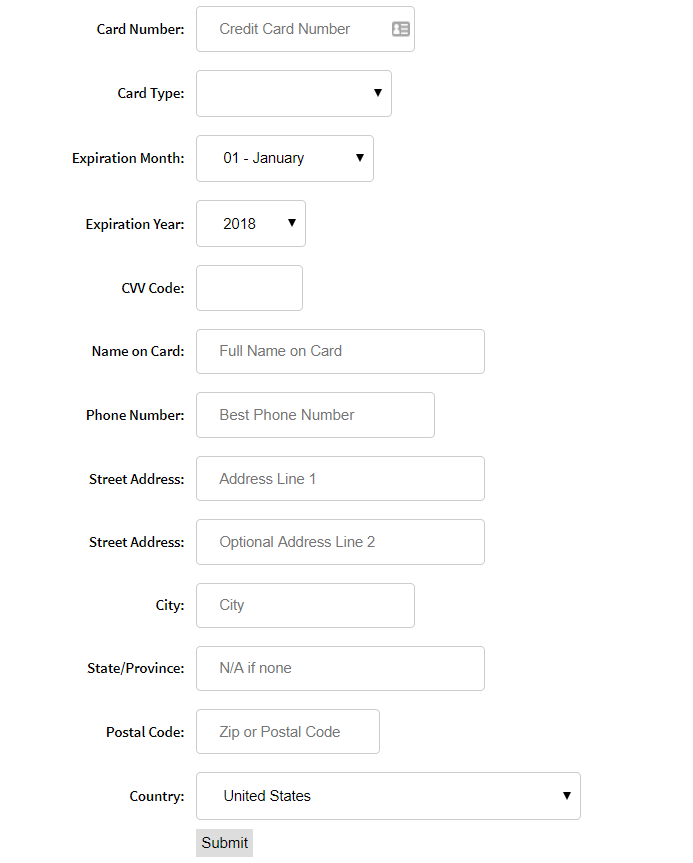
The below shortcode uses all parameters:
[memb_add_creditcard set_default=yes successurl=http://yourdomain.com/sucess-cc-added failureurl=http://yourdomain.com/fail addonly=yes]Shortcode Parameters
cardtypes | Comma separated list of credit card types for the dropdown. Defaults to all cards. |
|---|---|
backcharge | yes/no – Whether to charge this contact’s failed invoices with the new card. Please note that “backcharge=yes” will collect all unpaid invoices. |
successurl | The URL that is redirected to on successful credit card add. Defaults to current URL. |
failureurl | The URL that is redirected to on unsuccessful credit card add. Defaults to current URL. |
addonly | if TRUE – doesn’t display most recent card for editing, if FALSE – displays most recent card and allows user to edit and update information. Defaults to ‘FALSE’. |
set_default | If yes – adds the credit card as default for active subscriptions. This defaults to no in version 2.39 and lower while yes in version 2.40 and higher. |
tag_ids | A comma-separated list of Tag ID’s to add or remove when the credit card is successfully updated. |
action_ids | The ID of the actionset to run when the credit card is successfully updated. |
goals | The name of an API goal to run when the credit card is successfully updated. |
plan_ids | A comma-separated list of subscription plan IDs. |
Additional Information
Sample CSS code
The below code shows how you can style this form:
#memb_addupdate_creditcard-1 label { display:inline-block; width: 150px; margin-right: 10px; font-weight: normal; text-align:right; }
#memb_addupdate_creditcard-1 input[type=checkbox] { vertical-align: middle; }
#memb_addupdate_creditcard-1 select,input[type=text],[type=tel] {
 padding: 12px 20px;
 margin: 8px 0;
 display: inline-block;
 border: 1px solid #ccc;
 border-radius: 4px;
 box-sizing: border-box;
}
Shortcode Attributes
| Conditional | No |
|---|---|
| Nestable | No |
| Accepts formatting | No |
| Capturable | No |